


Alarm Clock
4.4950.00 Reviews
App Specs
- Version
- 4.7
- Updated On
- License
- Free
- Downloads
- 1,000,000+
- Developer
- Caller ID Name
- Categories
- Productivity
- Platform
- Android
Screenshots
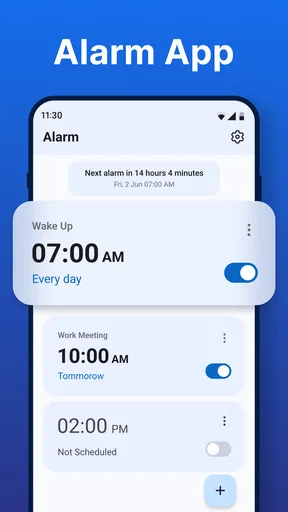
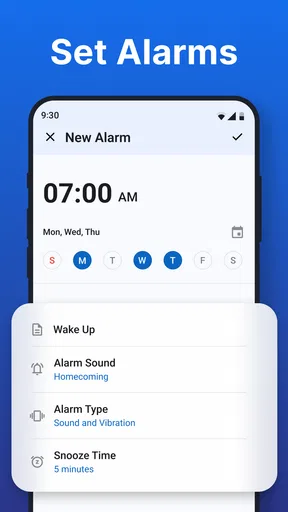
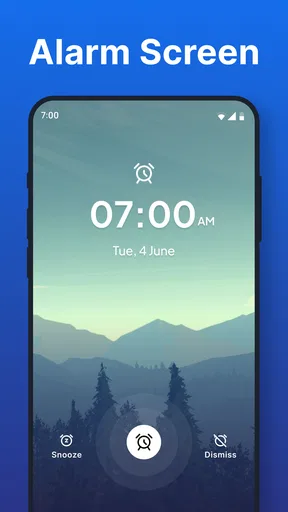
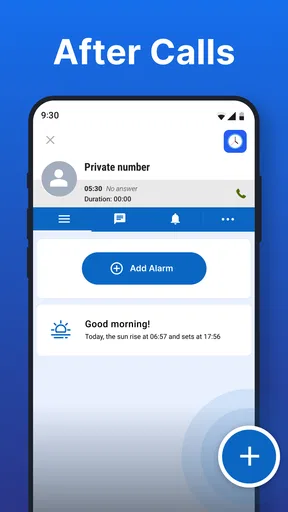
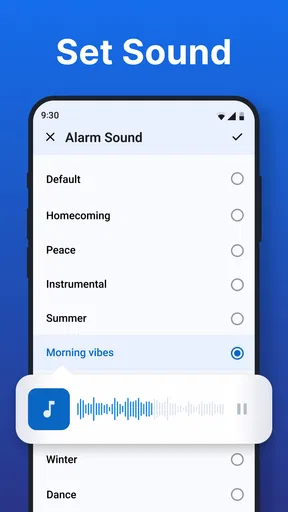
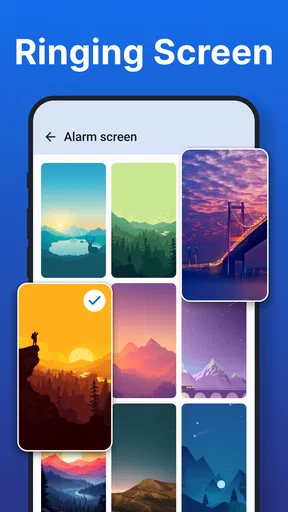
 Analysis by AppCompare
I usually think of an alarm as a small tool with a very specific job: make sure I remember something at the right moment. Alarm Clock takes that simple idea and places it inside a broader productivity routine. It can wake me up, remind me about a task, or alert me after a call, so its value depends less on how many options it has and more on whether I use it deliberately.
After spending time with it, I see it as a practical choice for people who want a lightweight reminder system rather than a full task manager. It is a free productivity app from Caller ID Name, rated 4.3 by roughly eighteen thousand users, with more than a million installs. Those figures suggest that its straightforward approach appeals to a wide audience, and I can understand why: there is very little conceptual overhead when the main action is simply setting an alert.
Build the workflow before setting the first alarm
The most useful way to approach Alarm Clock is not to start by creating random alerts. I first decide what kind of event I am trying to protect. A wake-up alarm, a short-term reminder, and a post-call alert all solve different problems. Treating them as one undifferentiated list can make the app less helpful, especially when several notifications compete for attention.
For waking up, the intention is obvious: the alert marks the beginning of the day. For a reminder, the important question is what action should happen immediately afterward. If I need to submit a form, take something with me, or return to a task, I get better results when the alarm is tied to that action rather than to a vague label such as “important.” The app can prompt me, but I still need to make the prompt meaningful.
The after-call use case is particularly practical. A phone conversation can interrupt whatever I was doing, and it is easy to promise myself that I will follow up later before forgetting entirely. Setting an alert after the call creates a deliberate handoff from conversation to action. I would use it for calling someone back, writing down an agreement, checking a message, or completing a task that could not be handled during the conversation.
That workflow also helps avoid a common mistake: using an alarm as a substitute for deciding. If I set alerts for every minor thought, the system becomes noisy. I prefer to reserve it for events that are time-sensitive, easy to overlook, or connected to an interruption. For ordinary to-do items, a conventional task list may be a better home.
Capture reminders while the context is still fresh
When I create an alert, I try to include enough wording to recover the context quickly. “Call back” is weaker than “call back about the delivery,” because the second phrase tells me why the alert exists. This matters most after a busy morning or a long series of phone calls, when a bare notification may not be enough to restart the right train of thought.
Worth Reading Before You Choose

EA SPORTS FC Mobile 26 Is a Bigger Football Game, but It Takes Time

Flipboard Shows What News Apps Must Do Beyond the Feed

Switching to Android Auto Means Rethinking Your Driving Routine

Google Calendar Makes a Crowded Week Easier to Manage

Ludo King Makes the Most of the Minutes Between Plans

Baby Panda World Brings Quick Play to Modern Phones, but Its Game Library Feels Busy
I also separate immediate reminders from recurring habits in my own planning. A one-time alert is useful for a deadline or a temporary obligation. A repeated alarm makes more sense for a stable routine, such as preparing for the next day or beginning a regular study period. Mixing those two purposes can make the reminder list harder to trust, so I would periodically remove alerts that no longer match my schedule.
A useful, less obvious habit is to set the alert for the preparation point rather than the final deadline. If an appointment begins later, the best reminder may be the moment when I need to leave, gather documents, or stop another activity. Alarm Clock is more effective when it protects the transition into an event, not only the event itself.
For example, imagine I finish a phone call while commuting and agree to send a document once I reach home. I would not create a reminder that merely says “document.” I would set an alert for a realistic point after arriving, with a label that identifies the recipient and the next action. That turns a vague promise into a small, recoverable workflow.
Keep the routine repeatable instead of ambitious
Productivity systems often fail because they ask for too much maintenance. Alarm Clock has an advantage here: an alert can be created around a specific moment without requiring me to build a complicated project structure. I can use that simplicity to support a few dependable routines rather than attempting to schedule every part of the day.
A sustainable routine usually has a clear trigger. After a call, I create a follow-up alert. Before going to bed, I check tomorrow’s important reminders. At the beginning of a work block, I set an alert for a task that must not be forgotten when the block ends. These routines are easier to repeat because they are attached to events that already happen.
The app is also useful for protecting recovery time. I would not use it only to push myself toward more work. An alert can remind me to stop, prepare for sleep, take a break, or leave an activity before it runs into the next commitment. That is one reason I see it as part of a sustainable productivity system rather than merely a louder to-do list.
Still, I would avoid filling the day with alarms at short intervals. Frequent alerts can create alert fatigue, where I dismiss everything automatically. The strongest setup is selective: a small number of reminders that represent real consequences if missed. If I need detailed sequencing, dependencies, notes, and progress tracking, a dedicated task or calendar app will usually provide a clearer structure.
Where this app fits beside ordinary alternatives
Compared with the default alarm tool on a phone, Alarm Clock is most appealing when I want reminders connected to everyday obligations rather than only waking up. Its focus on wake-up alerts, reminders, and alerts after calls gives it a broader practical role than a basic bedtime alarm.
Compared with a calendar, it is better suited to a quick prompt than to managing appointments, attendees, locations, or a long-term schedule. A calendar gives me a visual view of commitments; an alarm gives me a moment of attention. I would use the calendar to understand the day and this app to protect a specific action inside it.
Compared with a task manager, the trade-off is similar. A task manager is stronger when I need priorities, projects, checklists, and completion history. Alarm Clock is more direct when the main issue is remembering to act at a particular time. That directness is a strength for people who find elaborate productivity systems discouraging, but it can feel limited for users who want detailed organization.
Its free price also lowers the barrier to trying it. The Everyone content rating makes it approachable for a broad audience, while the minimum operating-system requirement of Android 10 means users on older Android releases should check compatibility before planning around it. The current version is 4.7, so I would still keep the app updated through the normal store process to benefit from the version available on the device.
Failure points that can undermine a good reminder
The first failure point is attention. An alarm can appear at the correct time and still fail if I dismiss it without understanding why it matters. Clear labels, restrained scheduling, and a realistic action immediately after the alert are more important than simply creating more reminders.
The second is timing. A reminder set too early becomes easy to ignore; one set too late becomes stressful or useless. I have found that transition reminders work best when they leave enough time for the next step. For a post-call follow-up, that might mean allowing time to finish the current activity and reach the place where the follow-up can actually be completed.
The third is routine drift. A recurring reminder may have made sense when my schedule was different, then quietly become irrelevant. I would review repeated alarms whenever my work hours, sleep pattern, or responsibilities change. An outdated alert is not harmless clutter: it teaches me that the notification system can be ignored.
There is also a practical distinction between an alarm and a record. If I need proof that I completed a task, Alarm Clock should not be my only tool. It can prompt an action, but I would record the result somewhere else when the outcome matters. This is especially important for work follow-ups, medication discussions, financial tasks, or anything that needs a reliable history.
Another limitation is that a reminder cannot solve an overloaded schedule. If I keep postponing the same alert, the real problem may be that the task is too large, unclear, or badly timed. In that situation, I would break the action into a smaller next step or move it into a task manager. Repeatedly snoozing a poorly defined reminder only hides the planning issue.
Small techniques that make the alerts more useful
My first technique is to write labels as verbs. “Send the invoice,” “pack the charger,” or “write the follow-up” gives me an immediate action. Nouns such as “invoice” or “charger” require an extra moment of interpretation, and that moment is often enough for me to postpone the task.
My second technique is to create a post-interruption checkpoint. After a call, meeting, or unexpected request, I set an alert for the point when I can return to my original plan. This prevents the interruption from becoming a permanent detour. It is a particularly good fit for the app because alerts after calls are part of its stated purpose.
My third technique is to use one alert to protect a boundary. I might set a reminder to stop working, begin preparing for sleep, or leave for an appointment. This keeps the app from becoming purely demand-oriented. A productivity routine that only tells me what to start can become exhausting; reminders about when to stop are just as valuable.
My fourth technique is to group alerts mentally by consequence. Some deserve immediate attention, some can wait, and some are merely helpful nudges. I would not try to express all of those levels by creating a crowded schedule. Instead, I use precise wording and choose only moments where a prompt genuinely improves the chance of completion.
Who should adopt it, and who should choose something else
I recommend Alarm Clock to someone who frequently says, “I need to remember this later,” especially after phone calls or interruptions. It is also a good match for people who want a free, uncomplicated productivity app for wake-up alerts and time-based reminders without committing to a large planning system.
Students, remote workers, caregivers, and people with irregular daily responsibilities may find the after-call and follow-up workflow useful. The app can act as a bridge between an interruption and the next action, which is often where memory fails. It is also approachable for someone who does not want to learn a complex project-management interface just to create a timely prompt.
I would be more cautious about recommending it as the only tool for a demanding professional schedule. If the day depends on shared calendars, detailed task ownership, recurring projects, documentation, or completion records, a calendar and task manager will offer stronger foundations. Alarm Clock can complement those tools, but it should not be expected to replace them.
I would also skip it if I dislike audible or attention-grabbing reminders altogether, or if my main need is a visual overview of the week. The app’s usefulness is tied to the moment an alert appears. Someone who prefers reviewing a list and choosing tasks flexibly may feel more comfortable with a conventional planner.
My final assessment after using it as a system component
Alarm Clock succeeds because it keeps the central action understandable: choose a moment and create a prompt. Its value grows when I connect that prompt to a clear workflow, particularly around waking up, returning to a task, or following up after a call. I would not treat it as a complete productivity environment, but I would happily use it as a focused layer between my schedule and my memory.
The app is free, accessible to Everyone, and developed by Caller ID Name. Its 4.3 average from about eighteen thousand ratings gives it a reassuring level of adoption, while its release on August 20, 2024, places it among relatively recent options in this space. Those details do not replace personal testing, but they make it a reasonable app to consider if the use cases match your routine.
The best reason to install Alarm Clock is not to create more alerts; it is to make a few important transitions harder to forget. If I use it selectively, write action-focused labels, review recurring reminders, and keep detailed planning elsewhere when necessary, it becomes a quiet support for a more reliable day. If I need projects, records, or a complete calendar view, I would choose another tool alongside it rather than forcing this focused app to do everything.
For my own recommendation, I would start with one wake-up or routine reminder and one post-call follow-up workflow. After a few days, I would keep only the alerts that genuinely improve my behavior. Used that way, Alarm Clock feels less like a collection of notifications and more like a small, practical safeguard against the moments when good intentions usually disappear.
Pros
- Simple interface makes alarms quick to create and manage.
- Supports multiple alarms for different schedules and routines.
- Custom labels help identify the purpose of each alarm.
- Useful repeat options for weekdays
- weekends
- or selected days.
- Reliable basic alarm features without unnecessary complexity.
Cons
- Limited customization compared with feature-rich alarm apps.
- Some useful options may require in-app purchases or ads.
- Alarm sounds can feel repetitive after extended use.
- Sleep tracking or smart wake features may be unavailable.
- Requires notification and alarm permissions to work correctly.
FAQs for Alarm Clock
What is Alarm Clock and what can I use it for?
Alarm Clock is a practical app designed to help you wake up on time and manage reminders throughout the day. After testing its main features, I found it useful for setting multiple alarms, choosing different sounds, and organizing wake-up schedules. It can also be helpful for medication reminders, appointments, study sessions, workouts, or any activity that requires a reliable notification.
Can I set multiple alarms and repeat them on specific days?
Yes, the app allows you to create multiple alarms for different purposes and schedules. You can generally choose a specific time, assign a label, select a ringtone, and configure repeat days such as weekdays, weekends, or individual days. This flexibility is especially convenient if your routine changes between workdays, school days, and days off.
Does Alarm Clock work when my phone is on silent or Do Not Disturb mode?
Alarm behavior can depend on your device model, operating system, volume settings, and battery restrictions. In my experience, it is important to check the app’s alarm volume separately from media volume and review Android or iOS Do Not Disturb permissions. Users should also allow notifications and disable aggressive battery optimization if alarms occasionally fail to sound.
Can I customize the alarm sound and snooze options?
Alarm Clock provides customization options that make waking up less repetitive and more suitable for different users. Depending on the version and platform, you may be able to choose built-in alarm tones, use available device sounds, adjust volume, and select a snooze duration. Some versions may also include gradually increasing volume or vibration settings.
Is Alarm Clock free, and does it require any special permissions?
The app may be available as a free download, although certain versions can include advertising, optional purchases, or premium customization features. Before installing, review the store listing for the current pricing and subscription details. Alarm apps commonly request notification, alarm, sound, and sometimes background activity permissions so they can alert you at the scheduled time.


